Hey everybody! Updating this a little bit later than usual. Devin and I spent the time after the Crimson Daggers and built an awesome monster snow man out back. Its pretty huge, somethin over 6 feet, just wait til I don't show you and it rots in the backyard... Withering away as the glory of spring destroys his monster heart D:.
Check the stream tomorrow
@6pm EST for my Monday night Character Drawing Session!
I'll be taking suggestions from the Chat and it will dictate how the final character comes out!
Anyways heres some of the content we covered during the stream today... Basically a lot of technical questions came up and we often referred to sources online from which we learned. Hopefully you'll give these a read through and learn somethin useful!
Composition! - Be sure to READ through ALL to absorb it!
LandScape Composition Rules! - Applies to all images though...
Phil Straub's Composition Tutorial
Fundamentals of Composition!
Hue Value Chroma! - Very important information! It is a very boring read but I would advise you really take the time to check it out.
HueValueChroma.com
Loomis PDF's! everybody seems to be looking for these... Download them here(right click - 'save link as' to save to the computer)!
Loomis PDFs!
Other than that I don't have much else to post. Not quite done with my study just yet but I'll try and update when I can :). Hope all that info helps! Keep on studying and seeee my daggers tomorrow!
And as always I got the other supplies I mentioned like the Plaster Cast I was studying today in the sidebar to the right here ---------------->
Metal! - W.A.S.P. - "Wild Child"
Showing posts with label tutorial. Show all posts
Showing posts with label tutorial. Show all posts
Sunday, February 28, 2010

Saturday, February 6, 2010
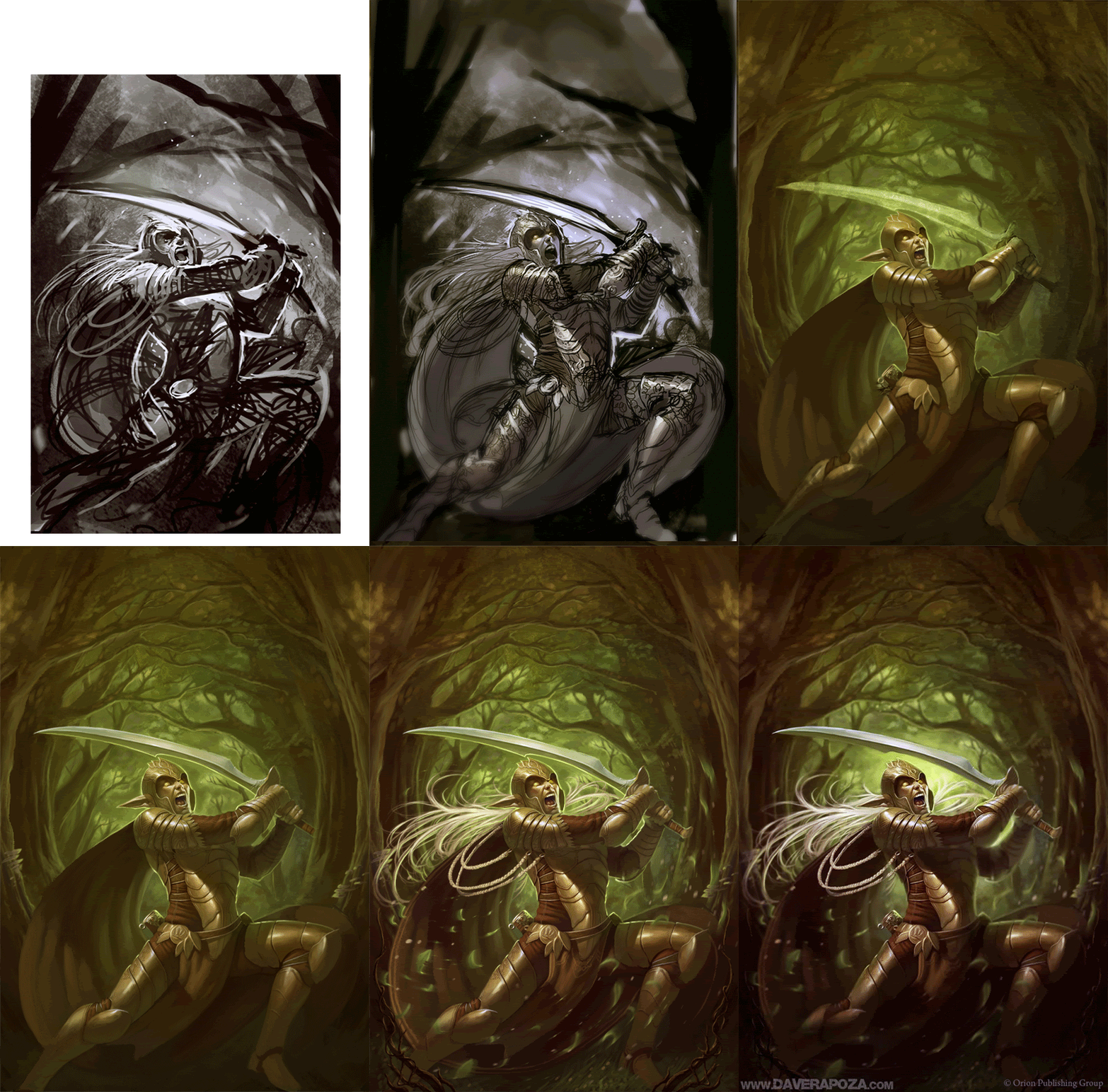
Elves Cover Process
Hey everybody! Heres a quick little process Gif I made of my Elves cover.
Basically its just - Sketch - Lines - Tones - Color Render until polished :D. Hope it helps a little!
(click to enlarge)
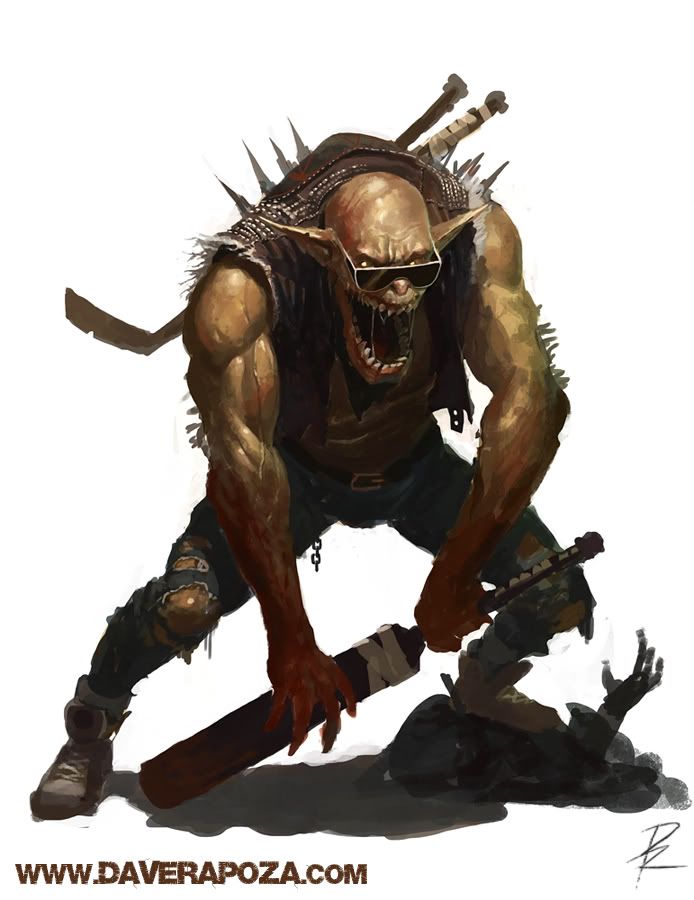
And heres some other work!
Metal! - Inherent Sin - "Gates of Hell"
Basically its just - Sketch - Lines - Tones - Color Render until polished :D. Hope it helps a little!
(click to enlarge)
And heres some other work!
Metal! - Inherent Sin - "Gates of Hell"
Friday, October 16, 2009
Creating Sketchin Brush - Skype Reviews?
Hey everybody! I got a few things to talk about today :). First off, things are finally flowin pretty good. The hard times I was talking about are pretty much over with! I'll be starting on my first set of Magic Cards at the end of the month and I'm really looking forward to it! Ever since I was 9 years old I've wanted to work on Magic so its been really awesome to finally have that dream realized. Not that its the ultimate goal for me but it was certainly on my list! I'm gonna put my everything into em and hopefully you'll see a lot more from me in the future :D.
Other than that I did up a new video on creating the custom sketchin brush I use in photoshop. This brush helped me a lot with my edges and whatnot so I hope you guys like it! Its a pretty standard custom brush that is simple and effective. My friend Devin Platts showed me how to make it a little while ago and I've been using it since.
Before you watch the video though I'd like some input... I was watching the Chiu stream(Bobby Chiu's live streaming thing) and he mentioned having people make Skype calls to ask questions to the people he was interviewing. So I was thinking that maybe I could get some of you guys to call me(or I could call other concept artists/illustrators as well) and we could either discuss certain aspects of art/freelance/the industry in general... Or I could go over your own work and screen capture critiques? You'd just need a mic and a skype account! Let me know what you guys think of that and I'll start brainstorming some ideas :).
Anyways! Heres the video!
Please click here and view in HD!

Metal! Armored Saint!
P.S. if you wanna know when updates are happenin on here you can always follow me on twitter as I always update on there when a post goes up.
Other than that I did up a new video on creating the custom sketchin brush I use in photoshop. This brush helped me a lot with my edges and whatnot so I hope you guys like it! Its a pretty standard custom brush that is simple and effective. My friend Devin Platts showed me how to make it a little while ago and I've been using it since.
Before you watch the video though I'd like some input... I was watching the Chiu stream(Bobby Chiu's live streaming thing) and he mentioned having people make Skype calls to ask questions to the people he was interviewing. So I was thinking that maybe I could get some of you guys to call me(or I could call other concept artists/illustrators as well) and we could either discuss certain aspects of art/freelance/the industry in general... Or I could go over your own work and screen capture critiques? You'd just need a mic and a skype account! Let me know what you guys think of that and I'll start brainstorming some ideas :).
Anyways! Heres the video!
Please click here and view in HD!
Metal! Armored Saint!
P.S. if you wanna know when updates are happenin on here you can always follow me on twitter as I always update on there when a post goes up.
Wednesday, August 19, 2009
Video Suggestions?
Well, I've been thinking a lot about what tutorial videos I could make... and I was having trouble coming up with anything very interesting. But since I've been into my own process so long I've probably lost sight of what I used to wish I knew. So I'm hoping that whoever checks out this blog has some questions about my process!
Just post a comment asking me what you'd like to see and I'll get to making a list of videos to make.

Thanks and look forward to hearing your suggestions!
Tormentor!
Tuesday, August 18, 2009
Grayscale to Color Video Tutorial
Hey everyone! I get a lot of questions about how I color my images annndd today I can hopefully address some of those. The video below is just somethin quick I made to show a basic process of adjusting the color on a grayscale image. This technique isn't for everybody... Mostly because you gotta be used to drawing straight grayscale and getting your values to a certain point. If you don't have much value range this approach doesn't work so well. But take from it what you can! I'm gonna get some sleep :D!
I've been looking at microphones online and found a few that seemed alright... As well as some decent editing program haha. I'd like to get more into making tutorials but just don't want to release a ton of crap quality ones. Hope you get somethin outta it at least :)!
and heres some metal... Slammer!
I've been looking at microphones online and found a few that seemed alright... As well as some decent editing program haha. I'd like to get more into making tutorials but just don't want to release a ton of crap quality ones. Hope you get somethin outta it at least :)!
and heres some metal... Slammer!
Subscribe to:
Posts (Atom)